> For the complete documentation index, see [llms.txt](https://dev-angelist.gitbook.io/crtp-notes/llms.txt). Markdown versions of documentation pages are available by appending `.md` to page URLs; this page is available as [Markdown](https://dev-angelist.gitbook.io/crtp-notes/readme/lab/3-lo-3.md).
# 3 - LO 3️
Learning Object 3
## Tasks
1 - Enumerate following for the dollarcorp domain:
* List all the OUs
* List all the computers in the DevOps OU
* List the GPOs
* Enumerate GPO applied on the DevOps OU
* Enumerate ACLs for the Applocker and DevOps GPOs
Flag 3 \[Student VM] - Display name of the GPO applied on StudentMachines OU 🚩
## Solutions
### 1 - Enumerate following for the dollarcorp domain:
Start InviShell and PowerView
```powershell
C:\AD\Tools\InviShell\RunWithRegistryNonAdmin.bat
. C:\AD\Tools\Powerview.ps1
```
#### 1.1 - List all the OUs of dollarcorp.moneycorp.local
```powershell
Get-DomainOU -Domain dollarcorp.moneycorp.local | select name, ou, distinguishedname
```
```powershell
name ou distinguishedname
---- -- -----------------
Domain Controllers Domain Controllers OU=Domain Controllers,DC=dollarcorp,DC=moneycorp,DC=local
StudentMachines StudentMachines OU=StudentMachines,DC=dollarcorp,DC=moneycorp,DC=local
Applocked Applocked OU=Applocked,DC=dollarcorp,DC=moneycorp,DC=local
Servers Servers OU=Servers,DC=dollarcorp,DC=moneycorp,DC=local
DevOps DevOps OU=DevOps,DC=dollarcorp,DC=moneycorp,DC=local
```
#### 1.2 - List all the computers in the DevOps OU
```powershell
(Get-DomainOU -Identity DevOps).distinguishedname | %{Get-DomainComputer -SearchBase $_} | select name
```
```powershell
name
----
DCORP-CI
```
#### 1.3 - List the GPOs
Get-DomainGPO | select displayname
```powershell
displayname
-----------
Default Domain Policy
Default Domain Controllers Policy
Applocker
Servers
Students
DevOps Policy
```
1.4 - Enumerate GPO applied on the DevOps OU
To enumerate GPO applied on the DevOps OU, we need the name of the policy from the gplink attribute from the OU:
```powershell
(Get-DomainOU -Identity DevOps).gplink
```
```powershell
[LDAP://cn={0BF8D01C-1F62-4BDC-958C-57140B67D147},cn=policies,cn=system,DC=dollarcorp,DC=moneycorp,DC=local;0]
```
We copy the value between {} including the brackets as well: `{0BF8D01C-1F62-4BDC-958C-57140B67D147}`
```powershell
Get-DomainGPO -Identity '{0BF8D01C-1F62-4BDC-958C-57140B67D147}'
```
```powershell
flags : 0
displayname : DevOps Policy
gpcmachineextensionnames : [{35378EAC-683F-11D2-A89A-00C04FBBCFA2}{D02B1F72-3407-48AE-BA88-E8213C6761F1}][{827D319E-6EAC-11D2-A4EA-00C04F79F83A}{803E14A0-B4FB-11D0-
A0D0-00A0C90F574B}]
whenchanged : 12/24/2024 7:09:01 AM
versionnumber : 3
name : {0BF8D01C-1F62-4BDC-958C-57140B67D147}
cn : {0BF8D01C-1F62-4BDC-958C-57140B67D147}
usnchanged : 296496
dscorepropagationdata : {12/18/2024 7:31:56 AM, 1/1/1601 12:00:00 AM}
objectguid : fc0df125-5e26-4794-93c7-e60c6eecb75f
gpcfilesyspath : \\dollarcorp.moneycorp.local\SysVol\dollarcorp.moneycorp.local\Policies\{0BF8D01C-1F62-4BDC-958C-57140B67D147}
distinguishedname : CN={0BF8D01C-1F62-4BDC-958C-57140B67D147},CN=Policies,CN=System,DC=dollarcorp,DC=moneycorp,DC=local
whencreated : 12/18/2024 7:31:22 AM
showinadvancedviewonly : True
usncreated : 293100
gpcfunctionalityversion : 2
instancetype : 4
objectclass : {top, container, groupPolicyContainer}
objectcategory : CN=Group-Policy-Container,CN=Schema,CN=Configuration,DC=moneycorp,DC=local
```
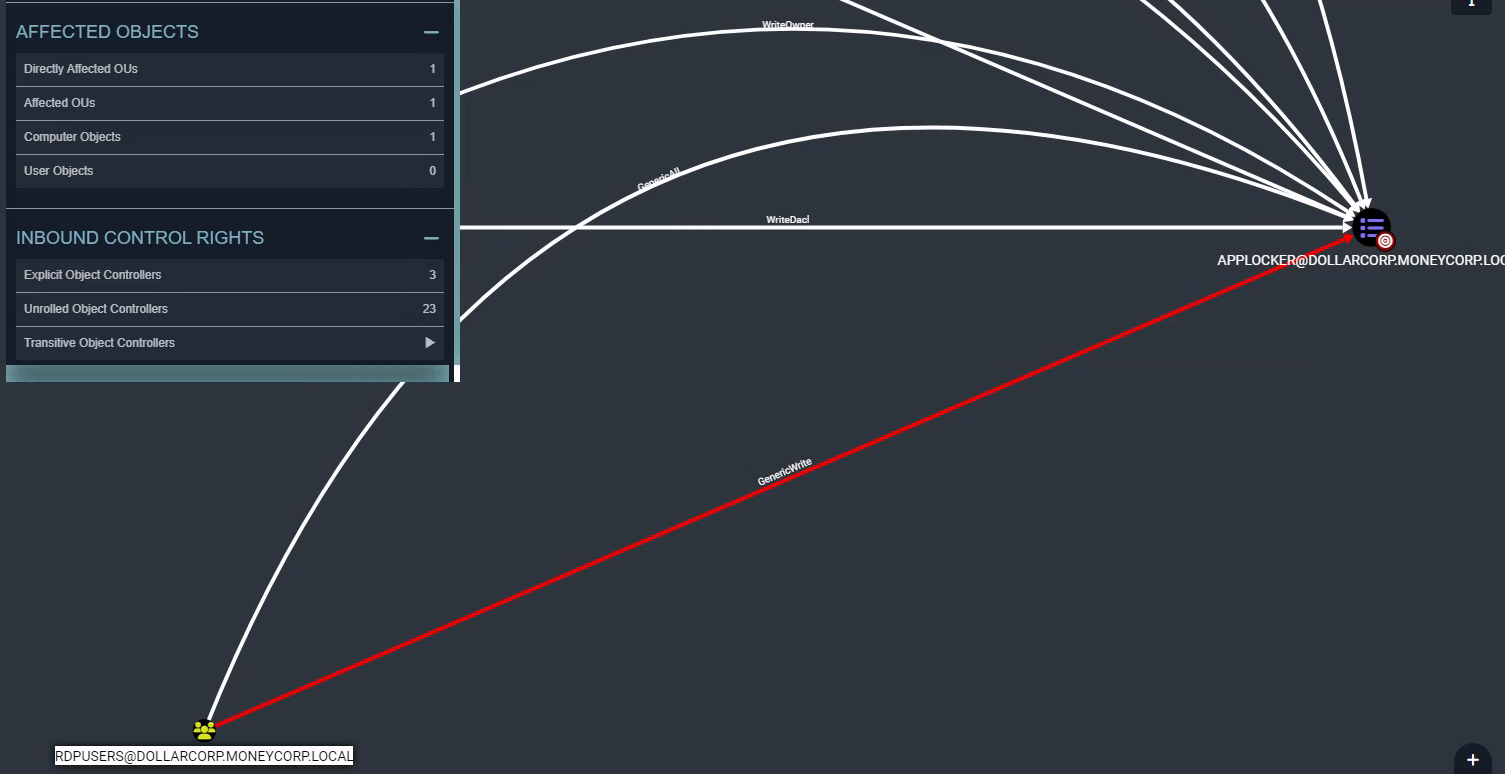
1.5 - Enumerate ACLs for the Applocker and DevOps GPOs
Let's use the BloodHound CE UI, search for Applocker in the UI -> Click on the node -> Click on Inboud Object Control
It turns out that the RDPUsers group has GenericAll over the policy.
Now, search for DevOps and look at its 'Inbound Object Control':
{% hint style="info" %}
devopsadmin
{% endhint %}
### Flag 3 \[Student VM] - Display name of the GPO applied on StudentMachines OU 🚩
Retrieve the gplink of StudentMachines OU
```powershell
Get-DomainOU | Where-Object {$_.Name -eq "StudentMachines"}
```
```powershell
usncreated : 44996
displayname : StudentMachines
gplink : [LDAP://cn={7478F170-6A0C-490C-B355-9E4618BC785D},cn=policies,cn=
system,DC=dollarcorp,DC=moneycorp,DC=local;0]
whenchanged : 11/15/2022 5:46:19 AM
objectclass : {top, organizationalUnit}
usnchanged : 45933
dscorepropagationdata : {12/5/2024 12:47:28 PM, 11/15/2022 3:49:24 AM, 11/15/2022
3:49:24 AM, 1/1/1601 12:00:01 AM}
name : StudentMachines
distinguishedname : OU=StudentMachines,DC=dollarcorp,DC=moneycorp,DC=local
ou : StudentMachines
whencreated : 11/15/2022 3:49:24 AM
instancetype : 4
objectguid : 1c7cd8cb-d8bb-412f-9d76-9cff8afa021f
objectcategory : CN=Organizational-Unit,CN=Schema,CN=Configuration,DC=moneycorp,DC
=local
```
and obtain the relative GPO name
```powershell
Get-DomainGPO -Identity '{7478F170-6A0C-490C-B355-9E4618BC785D}'
```
```powershell
flags : 0
displayname : Students
gpcmachineextensionnames : [{35378EAC-683F-11D2-A89A-00C04FBBCFA2}{D02B1F72-3407-48AE-BA8
8-E8213C6761F1}][{827D319E-6EAC-11D2-A4EA-00C04F79F83A}{803E14
A0-B4FB-11D0-A0D0-00A0C90F574B}]
whenchanged : 7/30/2024 1:30:35 PM
versionnumber : 9
name : {7478F170-6A0C-490C-B355-9E4618BC785D}
cn : {7478F170-6A0C-490C-B355-9E4618BC785D}
usnchanged : 247100
dscorepropagationdata : {12/5/2024 12:47:28 PM, 1/1/1601 12:00:01 AM}
objectguid : 0076f619-ffef-4488-bfdb-1fc028c5cb14
gpcfilesyspath : \\dollarcorp.moneycorp.local\SysVol\dollarcorp.moneycorp.local
\Policies\{7478F170-6A0C-490C-B355-9E4618BC785D}
distinguishedname : CN={7478F170-6A0C-490C-B355-9E4618BC785D},CN=Policies,CN=Syste
m,DC=dollarcorp,DC=moneycorp,DC=local
whencreated : 11/15/2022 5:46:19 AM
showinadvancedviewonly : True
usncreated : 45927
gpcfunctionalityversion : 2
instancetype : 4
objectclass : {top, container, groupPolicyContainer}
objectcategory : CN=Group-Policy-Container,CN=Schema,CN=Configuration,DC=moneyc
orp,DC=local
```